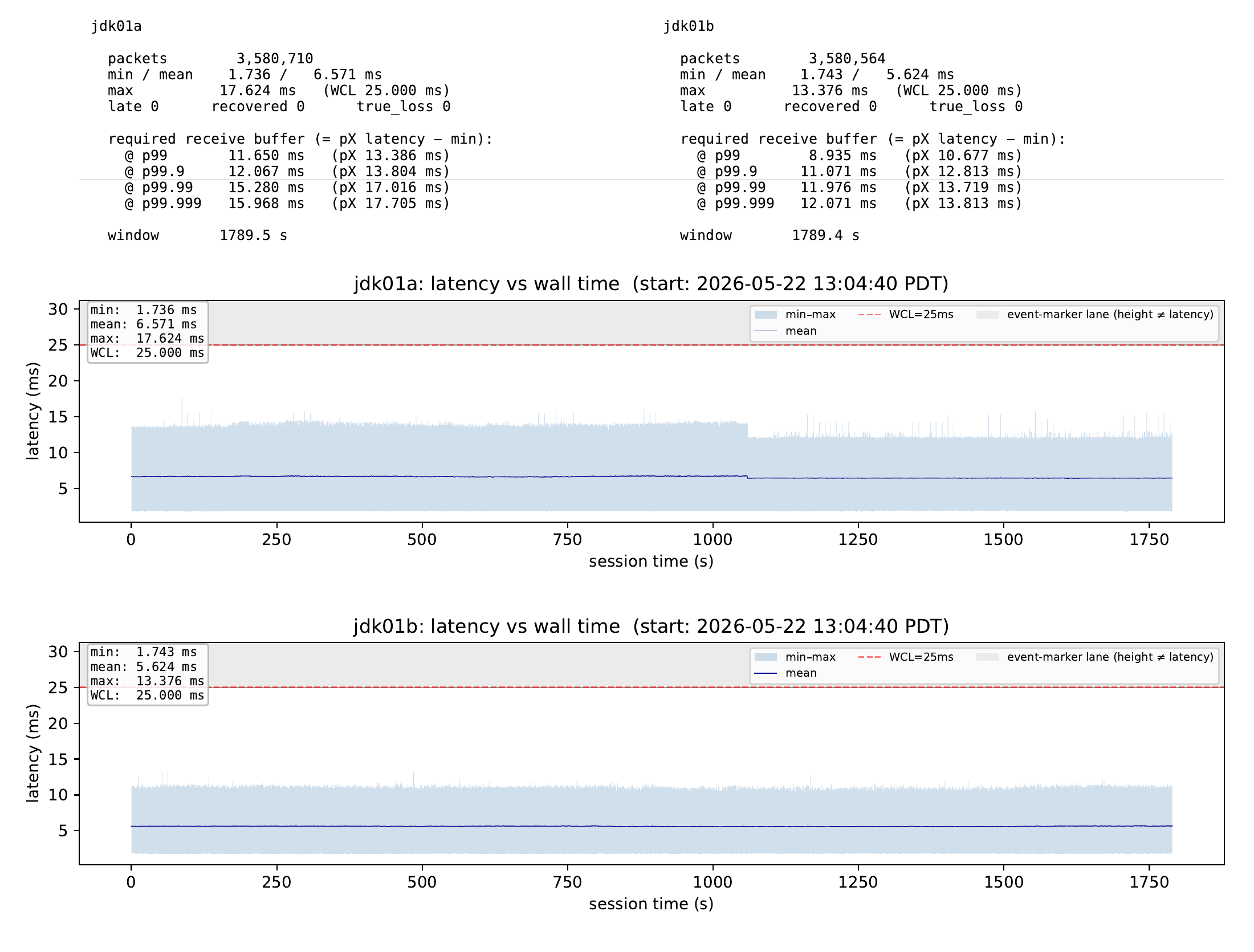
Evidence — Campbell ↔ Saratoga (near)
A Raspberry Pi 5 implementation streaming pro-audio between California cities over the public internet: Campbell ↔ Saratoga ↔ Los Angeles.
Jeff Koftinoff <jeff.koftinoff@statusbar.com> · Ford Motor Company. Enthusiastically involved with real-time audio, music, networking, time synchronization, and open source for almost all my life! A personal experiment, presented with Ford Motor Company's gracious support.
Connect on LinkedIn: linkedin.com/in/jdkoftinoff
Can a low-cost Raspberry Pi 5 run a full AVB stack — and can GPS time be the media clock for the whole planet?
You can't size the buffer until you've measured the network performance.
PREEMPT_RT · HZ=1000 · NO_HZ_FULL · RCU_NOCB_CPU · IRQ_FORCED_THREADING
isolcpus=2-3 nohz_full=2-3 rcu_nocbs=2-3 irqaffinity=0-1
Cores 2–3 leave the scheduler entirely; cores 0–1 take every IRQ and all of Linux.
MMU interference is unavoidable if any syscall is needed.
Cores 2 and 3 communicate exclusively through lock-free SPSC (single-producer / single-consumer) queues with no locks, no syscalls, and no shared scheduler. Cores 0–1 run Linux + all IRQs.
The BCM2712 MAC hardware-timestamps, but it has no separate priority queues, no packet launch-time control, and no traffic shaping.
One buffer keyed by presentation (gPTP/TAI) time sits between the cores: written by core 3 (network), read by core 2 at the exact playout time.
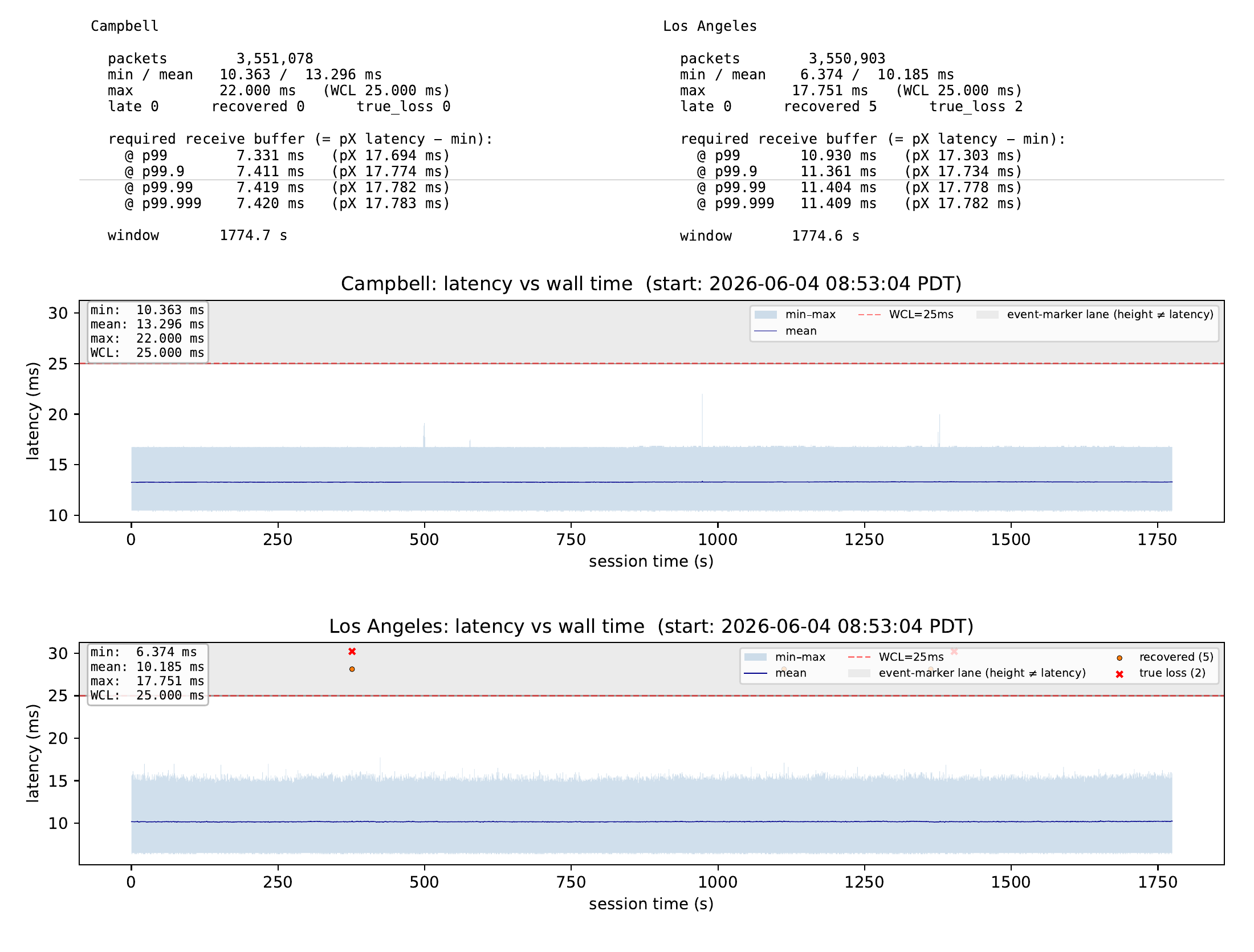
The last mile is where the primary latency is. The worst-case tail that sizes your buffer is residential-uplink bufferbloat — not the 10× distance.
| Channels | 8 |
|---|---|
| Samples / channel | 44 (352 total) |
| Format | int32 · 96 kHz |
| Audio per packet | 458.3 µs |
| Datagram rate | ~2181/s (×2 redundant) |
| PCM payload | 44×8×4 = 1408 B |
|---|---|
| + AAF header | 44 B |
| UDP payload | 1452 B · one MTU |
| Grandmaster ID | 70:B3:D5:FF:FE:ED:CF:FF |
Every packet's ptp_grandmaster_identity is a sentinel I defined in my own OUI-36 range (70-B3-D5-ED-C, 36 bits): this value declares the media clock is TAI disciplined by GPS/GNSS — one shared Earth clock domain. It's the only clock-domain field AAF-over-UDP carries, so two cities with independent GPS receivers know they share one timescale.
| Smp/pkt | Pkt/s | |
|---|---|---|
| Native AVB (LAN) | 12 | 8000 |
| UDP tunnel (WAN) | 44 | ~2181 |
Local format follows the device: MOTU 8A → AM824 (IEC 61883-6), Meyer Galaxy → AAF. The tunnel carries AAF-v1 over UDP either way — 12-sample AVB packets re-framed up to one MTU for the internet, then back at the far end. Both 8 ch / 96 kHz / int32.
AVB audio devices rejected gPTP derived from GPS.
Jitter hurts more locally than between sites, so use a different clock domain at each layer.
A model is always wrong but sometimes useful: pick the clock domain that's accurate enough for each requirement.
All under tight guardrails (see next slide).
Proof from this project: owlm_analyze, the masked re-analyzer, the colbin renderers, the test harnesses — reusable and tested, written with the model, not by it. Write code that's easy for an LLM to reuse — the components shown here are meant to be used exactly this way.

codeberg.org/statusbar
source code

abc.statusbar.com
AVB bandwidth calculator

avb.statusbar.com
AVB presentations

linkedin.com/in/jdkoftinoff
connect on LinkedIn
repos & caveats in the appendix → Jeff Koftinoff <jeff.koftinoff@statusbar.com>
Reference material : future work and repositories.
codeberg.org/statusbar
| core | net (raw + POSIX sockets, reactor) · realtime (RT timers, SCHED_FIFO) · itc (lock-free SPSC) · colbin (capture format) · tsn · ieee (Ethernet) · test · sg14 · buffer · config / toml / csv |
|---|---|
| crypto | AES-128/256 · AES-CBC / GCM / SIV · CMAC · HKDF · SHA-256 / 512 · Ed25519 · ECDSA · X25519 (standard encrypted AVB) |
| audio | dsp (SIMD, oscillators, complex-coefficient filters) · osc (Open Sound Control) · engine · midi · ltc (linear timecode) |
| avb | gptp (802.1AS) · ptpclient (linuxptp) · srp (SRP / MSRP / MVRP) · atdecc + nanoavb (AVDECC / 1722.1) · avtp (AAF / AM824 / CRF) · avb_entity · udptun (inter-site tunnel + redundancy) · owlm · stun (NAT) |
Caveats: personal experiment, not a product; a low-cost Pi 5 is not a certified AVB endpoint. MIT-licensed, as-is.
Intended next step: ‘make the RT core own the Ethernet port’ — non-real-time tasks reach the network only through a virtual TAP it controls.
| →SpacePgDn | Next slide |
| ←PgUp | Previous slide |
| + / − / 0 | Zoom slide in / out / reset |
| ↑ ↓ | Scroll a zoomed slide |
| f | Fullscreen the browser |
| t | Toggle dark / light theme |
| Home / End | First / last slide |
| On the PDF slides | Click ⤢ Fullscreen PDF, then use the PDF viewer's own zoom & scroll |
| ? / Esc | Toggle / close this help |
The bar at the bottom of the screen has the same buttons (for an air-mouse remote).